
A Rumble video downloader can help you save permitted videos for offline viewing, editing, or personal archiving. The simplest options include creator tools, browser-based download services, and desktop applications. You should only save videos you own or have permission to download.
Rumble currently restricts unauthorized automated access and copying under its platform terms. Those rules matter when choosing any third-party downloading method. U.S. users should also consider copyright rights before redistributing downloaded material.
Quick answer: You can save eligible Rumble videos by downloading your own creator content, using a permitted browser tool, or using desktop software. Copy the individual video URL, process it with your chosen method, select an available format, and save the file. Always confirm that you have permission first.
Rumble Video Downloading at a Glance
| Question | Practical answer |
|---|---|
| Best option for your own content | Use creator or Studio download features when available |
| Common downloaded format | MP4 |
| Audio-only options | Depends on the downloader used |
| Works on phones | Many browser tools work on Android and iPhone browsers |
| Account required | Often not for public URLs |
| Private videos supported | Usually no |
| Live streams supported | Usually only after a replay becomes available |
| Main legal concern | Copyright, licensing, and platform terms |
| Best use | Your own videos, licensed media, or content you have permission to save |
Key Takeaways
* Use official creator features whenever they meet your needs. * Third-party tools usually require an individual public video URL. * Available resolution depends on the source video and chosen tool. * MP4 is commonly offered because it works across many devices. * Private, deleted, or restricted videos may not work. * Downloading a file does not automatically grant reuse rights. * Never give an unknown downloader your Rumble password. * Review current platform terms before using automated tools.
What Is a Rumble Video Downloader?
A Rumble video downloader is software or a web service that saves an accessible video file locally. Most tools ask you to paste the URL of a specific video. They show more download options.
Some services provide only MP4 video files. Others offer audio extraction or multiple resolution options. Features vary because each service processes media differently.
Current search results also show browser tools, desktop applications, and command-line solutions. Browser tools usually appeal to occasional users because they require little setup. Desktop software can suit users managing larger collections of permitted media.
Readers interested in related download technology can also explore Magclone’s Fast DL setup guide. That guide explains another approach to moving digital files efficiently. It can help readers understand how download delivery works more broadly.
3 Ways to Download Rumble Videos Safely
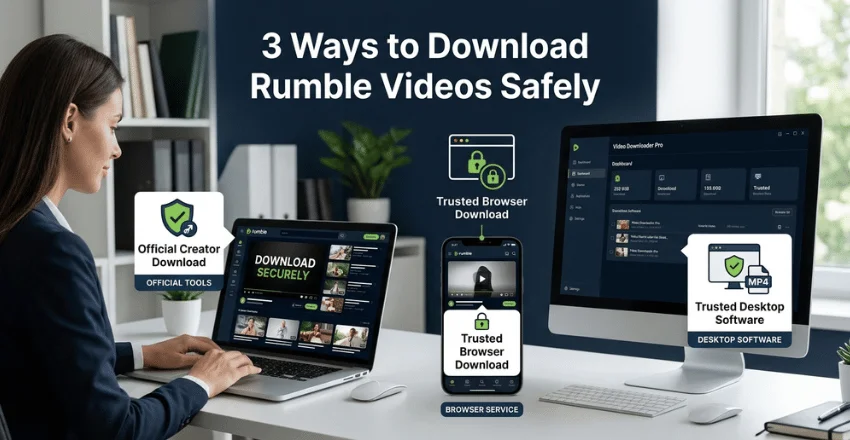
The right method depends on who owns the video and why you need it. Start with official options whenever possible. Move to third-party software only after checking permission and platform rules.
1. Download Your Own Creator Content
Creators should first check whether Rumble provides a direct download option for their content. Rumble Studio currently allows generated clips to be downloaded as MP4 files. This method avoids unnecessary third-party processing.
Official creator tools are particularly useful when you need clips for editing or republishing. They also reduce concerns about handing URLs to unrelated services. Available features may differ between standard uploads, Studio clips, and completed streams.
You can prepare downloaded footage with tools covered in Magclone’s online video editing services guide. Editing becomes useful when you need shorter highlights or social clips. Always keep an untouched original before making major changes.
2. Use a Browser-Based Downloader for Permitted Videos
Browser-based tools generally work by accepting a public video URL. Copy the link, paste it into the service, and review the available formats. Some tools currently advertise MP4, MP3, or multiple resolution options.
These services can be convenient because they often require no installation. They may work in browsers on Windows, macOS, Android, and iPhone. Actual support depends on the website and the source video.
Avoid any downloader that requests your Rumble password for ordinary public media. A public video URL normally provides the information such tools need to process the request. Sharing account credentials with an unrelated service adds unnecessary security risk.
3. Use Desktop Software When You Need More Control
Desktop download software can offer queues, file organization, or additional format choices. Some current tools advertise support for completed replays and higher-resolution files. Those capabilities vary between products and can change over time.
Desktop tools also require more trust because you install software on your device. Check the developer, installation source, permissions, and update process first. Avoid installers that bundle unrelated software or demand suspicious account access.
After saving permitted footage, creators may also use Magclone’s AI lip sync tools guide. That resource covers tools aimed at video creators. It is useful when downloaded material is part of a legitimate production workflow.
How to Use a Rumble Video Downloader Step by Step
Most permitted browser-based workflows follow a similar process. The exact buttons may differ between services. Always review the site’s current instructions before submitting a link.
1. Open the video you want to save. Confirm that it is your content or that you have permission to download it. 2. Copy the individual video URL. Avoid channel pages, search pages, or general profile links. 3. Open your chosen downloading method. Use an official option when one is available for your content. 4. Paste the video URL. Let the service analyze the available media. 5. Choose a format or resolution. Pick MP4 for broad video compatibility when that option is offered. 6. Save the file to your device. Check that the completed file plays correctly before closing the browser. 7. Keep proof of permission when necessary. This is especially useful for commercial editing, publishing, or client work.
Public video tools cannot normally retrieve media that has been deleted or access-restricted. Some also reject live broadcasts until an archived replay becomes available. A failed request does not always mean your device has a problem.
Which Video Quality Should You Choose?
Higher resolution usually produces a larger file. A long 1080p video can require much more storage than a lower-resolution copy. Choose quality based on how you plan to use the file.
For a television or desktop display, higher resolution may look better. For a phone or spoken-word program, a smaller file can be more practical. No downloader can restore visual detail that was absent from the available source.
Some current services advertise several available renditions rather than generating new quality levels. That distinction matters because selecting a higher label does not guarantee true additional detail. The original upload remains the limiting factor.
Can You Download Rumble Videos on iPhone or Android?
Many web-based services can be opened through a mobile browser. The usual method is copying a video link and pasting it into the tool. File handling differs between Android and iOS.
Android usually saves downloads only to the device’s Downloads folder. Safari on iPhone normally exposes downloaded files through Apple’s Files interface. Your exact location can vary with browser and device settings.
Mobile users should be especially cautious with aggressive pop-ups or fake download buttons—close suspicious pages instead of installing unknown profiles or applications. A basic video download should not require unusual device permissions.
For more general technology tutorials, readers can browse MaMagclone’s tech section. It contains guides covering software, online platforms, and digital tools. This gives readers a natural next step after completing the download process.
Is Downloading Rumble Videos Legal in the United States?
The answer depends on ownership, permission, intended use, and applicable rights. Saving your own work is different from copying another creator’s copyrighted material. Downloading a file also does not automatically permit you to republish it.
Rumble’s current terms state that platform content is protected by intellectual-property rights. The terms also restrict copying or reproducing content except where expressly authorized. They separately prohibit automated software from accessing the site without prior written permission.
Because those terms can change, check the current rules before relying on an automated service. Copyright questions can also depend on specific facts and planned use. Seek qualified legal advice when a commercial project creates meaningful rights questions.
Why a Rumble Download May Fail
A download can fail even when the same workflow worked previously. The video may have been removed, restricted, or changed by its uploader. The service processing the URL may also be temporarily unable to reach the source.
Another common problem is using the wrong type of URL. Many tools accept individual watch or embed links but reject channel pages. Copy the direct address from the video itself before retrying.
Live broadcasts can create another limitation. Several services only process completed streams after an archived replay exists. Waiting for the replay can solve a problem that no browser setting will fix.
Safety Tips Before Using Third-Party Download Tools
Treat an unfamiliar downloader like any other external web service. Check whether it uses HTTPS and avoid pages filled with misleading buttons. Never install unexpected browser extensions merely to complete one download.
Do not provide account passwords, payment details, or private links unless you have a clear reason. Public-video processing should not require your account credentials. Leave the site if it asks for information unrelated to the task.
Scan downloaded files when your operating system warns you. Check system warnings. Check that video files have the format you expected before you open them. Keeping your browser and security software updated reduces common risks.
Frequently Asked Questions
What is the best Rumble downloader?
No single option fits every use case. For your own content, official creator download features are the safest starting point. For other permitted public media, compare reputable tools based on format support, privacy, and device compatibility.
Can I save a Rumble video as MP4?
Many current third-party tools advertise MP4 downloads for public videos. Available quality depends on the original media and service. Check the resulting file before deleting any original copy.
Can I only download MP3?
Some current services offer MP3 or other audio-only choices. Others only provide the youIn thconvert permitted footagemitted footage can be converted afterward with suitable editing software.
Can I download private Rumble videos?
Public download tools generally cannot access private or otherwise restricted media. Access restrictions exist for a reason and should not be bypassed. Use an authorized creator workflow when you control the content.
Do Rumble downloaders work with live streams?
Support varies between tools. Some services only handle a livestream after it ends and becomes an archived replay. Check the video’s status before troubleshooting your downloader.
Do I need a Rumble account?
Many third-party processing n’tic URLs do not require an account. Official creator features naturally require access to your creator account. Never share login credentials with an unrelated downloader.
A Better Way to Handle Offline Video
Start with the simplest method that respects ownership and platform rules. Official creator tools are the strongest choice for content you uploaded yourself. A reputable third-party method may suit other media you are authorized to save.
Check the file format, available resolution, and storage requirements before using it for mission-critical content. These small steps can prevent technical, security, and rights problems later.
A Rumble video downloader should be treated as a practical file tool rather than permission to reuse someone else’s work. Choose a method that fits your device and legitimate purpose. Then save only the content you have a right to keep.